OAuth
Each Mixpost instance is its own OAuth 2.1 server. Apps sign users in with their Mixpost account instead of asking them for a personal key: AI clients such as ChatGPT and Claude connect to the MCP server this way, and apps you build can call the REST API the same way.
Connecting an app
When an app connects, Mixpost shows a consent screen with the app's name, the domain it returns to — marked verified for well-known clients and for apps an administrator registered — what it will be able to do, and the account you are signed in with. Click Allow access to connect.
Screenshot:
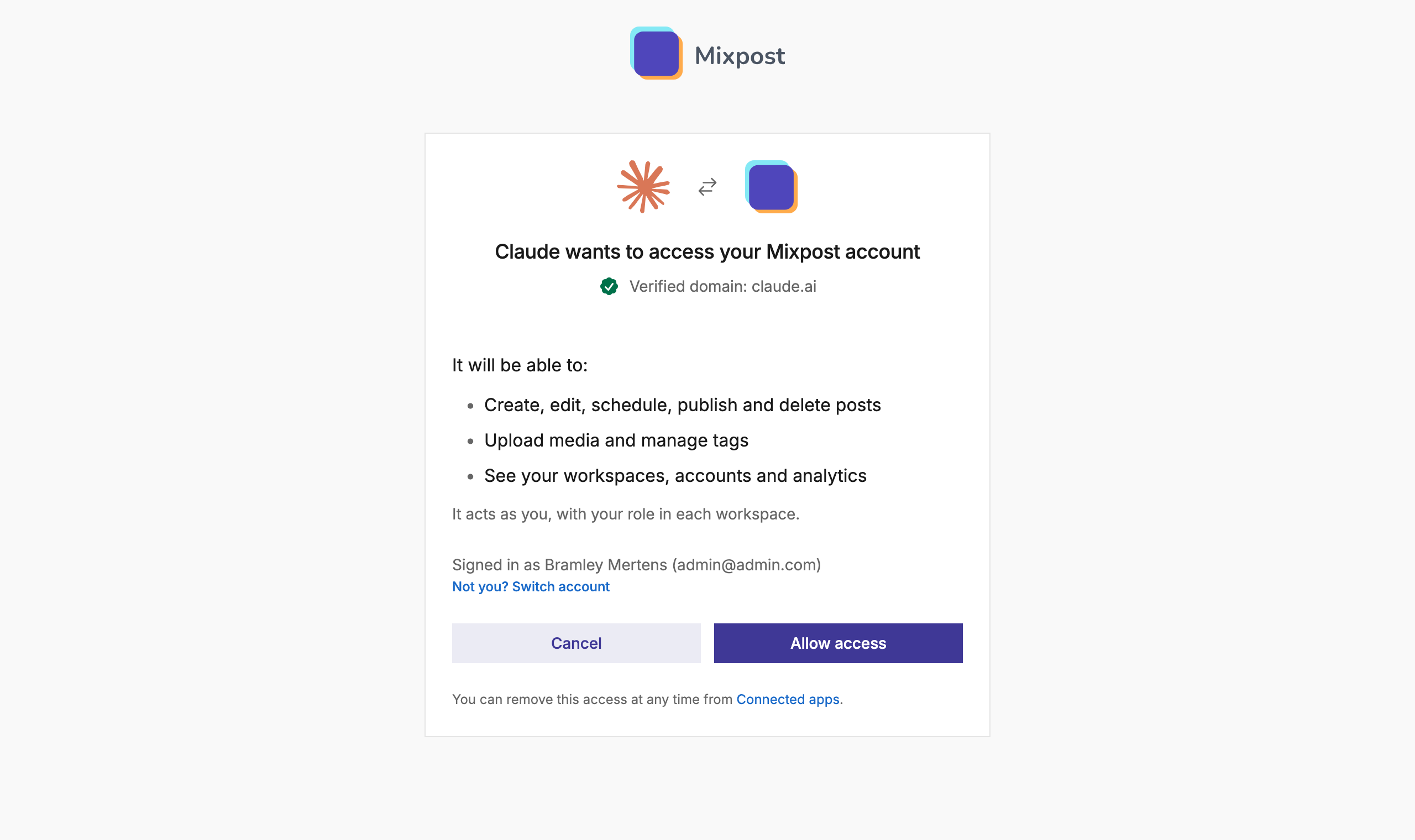
- The app acts as you, with your role in each workspace, exactly like a personal key.
- The app keeps itself signed in. Access tokens last an hour and the app renews them on its own. The renewal is valid for 90 days and starts over each time it is used, so you only sign in again after 90 days without using the app.
- You stay in control. Connected apps, in the user menu, lists every app you allowed; Disconnect removes its access straight away.
Kinds of apps
- Apps that register themselves. MCP clients such as ChatGPT, Claude, Cursor or Claude Code register
the first time someone connects them, through a Client ID Metadata Document or dynamic registration.
They reach the MCP server only; the REST API rejects their tokens with
403. Administrators decide who may register. - App clients. Apps an administrator registers, such as a CRM or an internal tool. They get a client ID, and a secret when they run on a server, and reach the REST API, the MCP server, or both.
Automatic registration
Administrators choose which apps may register themselves under Automatic OAuth registration, in Settings → General of the Admin console:
- Anyone (the default): any app can connect.
- Only allowed domains: only apps from the listed domains, subdomains included. The list starts with the domains of well-known clients such as ChatGPT and Claude. An app's name is whatever it says, so it is matched by the domain serving its metadata document, or by the domain its redirect URIs point to.
- Off: only app clients can connect.
Allow local apps also lets in desktop and command-line apps, such as Claude Code and Cursor, which sign in through a local address and have no domain to check. What they receive stays on the computer of the person who approves them.
The setting also applies to apps that are already connected: one that no longer qualifies stops working straight away and is marked Not allowed on the OAuth apps page.
Block an app
OAuth apps, under System in the Admin console, lists every app that registered itself, the ones in use first, with how many users connected it and when it was last used. Block cuts an app off for everyone; Unblock lets it connect again.
Register an app
An administrator registers an app before it can sign anyone in:
- Open the Admin console and click OAuth apps, under System.
- Click Create app and fill in:
- Name and Logo (a PNG), both shown on the consent screen.
- Redirect URIs, up to 10: an
httpsaddress, a loopback address (http://127.0.0.1:…) or an app scheme (myapp://callback). Click Add redirect URI for another one. - Access: REST API, MCP server, or both.
- Server-side app with a client secret: leave it on for an app that runs on a server; turn it off for a mobile or browser app, which cannot keep a secret.
- Click Create, then copy the client ID and, for a server-side app, the client secret.
The secret is shown once. From the same list you can edit the app, rotate its secret (the old one stops working straight away) or delete it, which disconnects everyone who signed in with it.
Sign a user in
-
Send the user to the authorization endpoint:
https://example.com/<core path>/oauth/authorize?response_type=code&client_id=<client ID>&redirect_uri=<redirect URI>&state=<random value>When the user clicks Allow access, they come back to your redirect URI with a
codeand yourstate. -
Exchange the code for tokens:
curl -X POST 'https://example.com/<core path>/oauth/token' \-u '<client ID>:<client secret>' \-d 'grant_type=authorization_code' \-d 'code=<code>' \-d 'redirect_uri=<redirect URI>'The response holds an
access_token, valid for an hour, and arefresh_token. -
Call the API with
Authorization: Bearer <access token>, exactly like a personal key. -
Before the access token expires, get a new pair with
grant_type=refresh_tokenandrefresh_token=<refresh token>. Refresh tokens rotate on every use.
When MIXPOST_CORE_PATH is empty, drop the <core path> segment.
Reference
| Endpoint | URL |
|---|---|
| Protected resource metadata | https://example.com/.well-known/oauth-protected-resource/<core path>/mcp |
| Authorization server metadata | https://example.com/.well-known/oauth-authorization-server/<core path> |
| Authorization | https://example.com/<core path>/oauth/authorize |
| Token | https://example.com/<core path>/oauth/token |
| Dynamic client registration | https://example.com/<core path>/oauth/register |
| Revocation | https://example.com/<core path>/oauth/revoke |
- Discovery. An unauthenticated request to the MCP endpoint returns
401with aWWW-Authenticate: Bearer resource_metadata="…"header pointing at the protected resource metadata. - Registering without an administrator. Use a Client ID Metadata Document — an
httpsURL as theclient_id, whose document names the sameclient_idand itsredirect_uris— or register dynamically. Dynamic registration creates public clients only, acceptshttps, loopback and app-scheme redirect URIs, and is rate limited. When registration is limited to certain domains, other redirect URIs are refused withinvalid_redirect_uri; when it is off, the endpoint returns403and the server metadata no longer lists it. - Grants. Authorization code and refresh tokens, which rotate on every use.
- PKCE. Required for apps without a secret: send
code_challengeandcode_challenge_method=S256, thencode_verifierwith the code. An app with a secret may use PKCE too. OnlyS256is accepted. - Client authentication.
- An app client with a secret sends it with HTTP Basic authentication or as a
client_secretform field. - A client whose metadata document lists
private_key_jwtand anhttpsjwks_urimay sign a JWT with one of its published keys and send it asclient_assertion, withclient_assertion_type=urn:ietf:params:oauth:client-assertion-type:jwt-bearer, on token and revocation requests. The JWT'sissandsubare theclient_id, itsaudis the issuer or the endpoint it is sent to, and it expires within an hour; each one is accepted once. Supported algorithms: RS256, RS384, RS512, PS256, ES256, ES384 and EdDSA. A client that does not also listnonemust always send one. - Any other client sends only its
client_idand relies on PKCE.
- An app client with a secret sends it with HTTP Basic authentication or as a
- Scopes.
apifor the REST API andmcpfor the MCP server, separated by a space. Apps that register themselves getmcponly. When thescopeparameter is left out, an app gets every access it may have; asking for one it may not have returnsinvalid_scope. - Resource. An optional
resourceparameter must behttps://example.com/<core path>/apior the MCP endpoint URL. - Where a token works. A token with the
apiscope works on the REST API and one withmcpon the MCP server. Used anywhere else, it returns403withThis token cannot be used for this resource.
Turn OAuth off
OAuth is on by default. On a self-hosted instance it can be turned off with MIXPOST_OAUTH=false;
apps then connect with personal keys only. ChatGPT and Claude can only reach an instance that is
publicly available over HTTPS.