Webhooks
Allow external services to be notified when certain events happen.
Overview
A webhook sends an HTTP request to a URL you choose every time one of the selected events happens in a workspace — a post is published, a post fails, an account is connected. Use it to start an n8n or Zapier workflow, post a message to Slack, or keep your own system in sync.
Webhooks belong to a workspace and only workspace admins can create and manage them.
Create a webhook
1. Open Webhooks
Open your workspace and click Webhooks in the sidebar.

2. Create a webhook
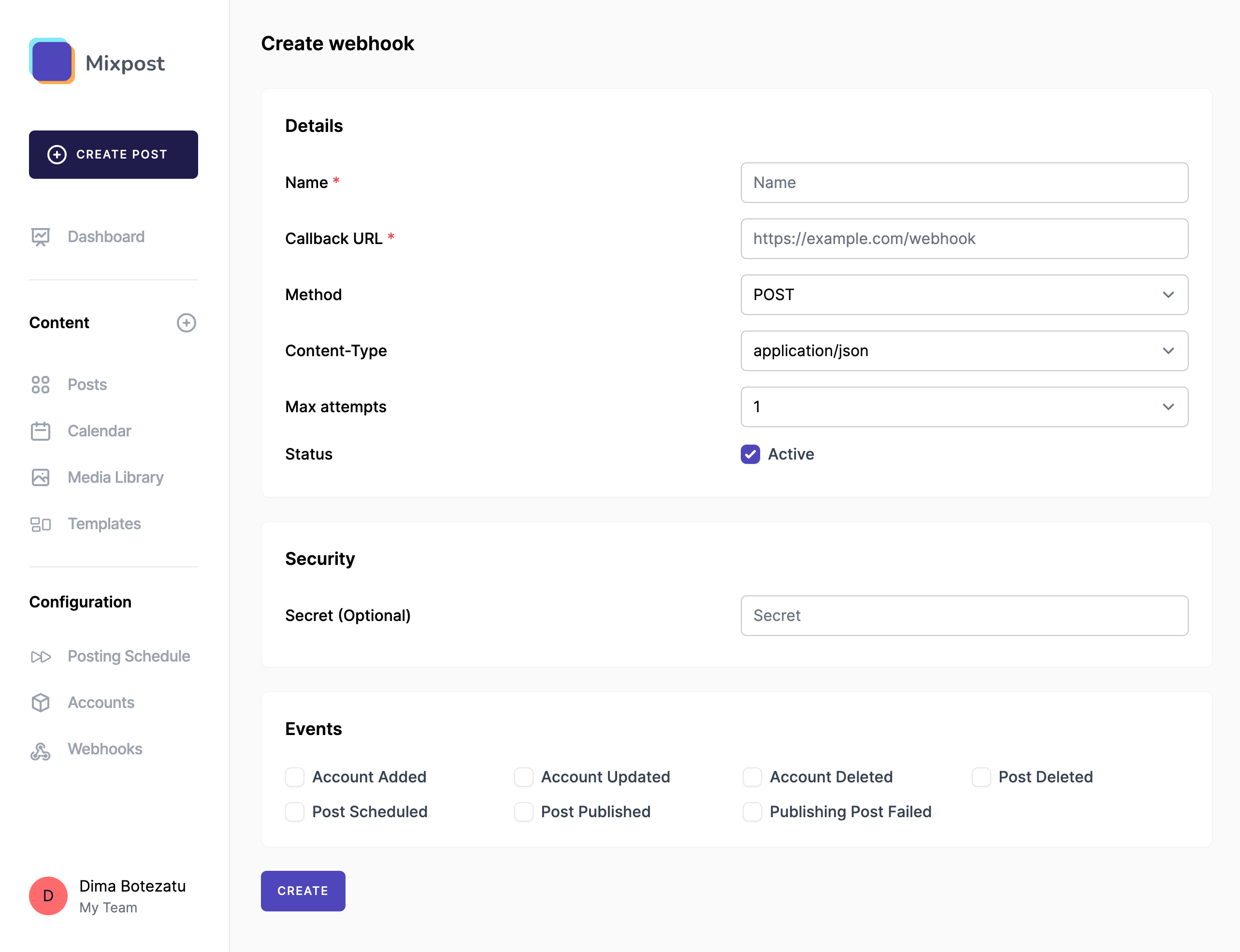
Click Create webhook and fill out the form:
- Name: A name that tells you what the webhook is for, for example n8n: publishing workflow.
- Callback URL: The URL that receives the requests. It must be reachable from your Mixpost server.
- Method:
POST(the usual choice),GET,PUTorDELETE. - Content-Type:
application/jsonorapplication/x-www-form-urlencoded. - Max attempts: How many times a failed delivery is tried, from 1 to 3. See Retries.
- Status: Turn the webhook off to pause deliveries without deleting it.
- Secret (optional): Used to sign every delivery. See Secure the webhook.
- Events: The events that trigger the webhook. See Events.
Click Create. From now on the webhook sends a request for each selected event.
3. Send a test
To check that your endpoint is reachable, open the webhook and click Test webhook. It sends a
test event straight away and records it in the deliveries:
{
  "event": "test",
  "data": {
    "message": "This is a test event.",
    "webhook": {
      "uuid": "9b1f5c3e-2a4d-4e8b-9f61-3c2b7d0a1e55",
      "name": "n8n: publishing workflow"
    },
    "triggered_at": "2026-10-14 09:02:11"
  }
}
Events
| Event | Sent when |
|---|---|
post.scheduled | A post is scheduled. |
post.published | A post is published to an account. Sent once per account. |
post.published_all | A post has been published to all of its accounts. |
post.publishing_failed | A post could not be published to an account. Sent once per account. |
post.deleted | A post is deleted. |
account.added | A social account is connected. |
account.updated | A social account is updated or reconnected. |
account.deleted | A social account is removed. |
Payload
Every request has the same envelope: the event name and its data.
{
  "event": "post.published",
  "data": {
    "uuid": "…",
    "status": "published",
    "versions": [],
    "accounts": [],
    "tags": [],
    "account": {}
  }
}
- Post events send the post in the same shape the API returns from
Get a post.
post.publishedandpost.publishing_failedalso addaccount: the account this delivery is about, including itsexternal_urland any errors. - Account events send the account in the same shape as Get an account.
- Deletions send only identifiers:
post.deletedsends theuuidsof the deleted posts, withto_trash: truewhen they were moved to the trash, andaccount.deletedsends the account'suuid.
Each request carries these headers:
| Header | Value |
|---|---|
Content-Type | The content type chosen for the webhook. |
X-Request-Source | The name of your Mixpost app, from APP_NAME. |
X-Signature | Only when the webhook has a secret. See Secure the webhook. |
Deliveries
Every request is recorded. Open the webhook and click Webhook deliveries to see each one with its event, status and HTTP status code. Open a delivery to inspect the payload that was sent and the response your endpoint returned.

A delivery succeeds when your endpoint answers 200, 201 or 202. Any other status code, a
timeout or a connection error marks it as failed.
Retries
When Max attempts is above 1, a failed delivery is tried again automatically after 2 minutes, then after 4 minutes. The delivery shows when the next retry is due.
You can also send any delivery again yourself with Resend.
Secure the webhook
Always secure your webhooks with a secret key: it is what lets your server tell a genuine delivery from anything else that finds your callback URL.
When a webhook has a secret, every delivery includes an X-Signature header: an HMAC-SHA256 hash
of the JSON payload, signed with the secret. Compute the same hash on your side and compare the two.
If you lose the secret, open the webhook and use Change secret in the Security section. Update every integration that uses it, as deliveries are signed with the new secret straight away.
Following is an example showing how verification might look.
PHP Example
For example, you can define the following verifySignature function:
function verifySignature(string $payloadContents, string $receivedSignature) {
	$secretKey = getenv('SECRET_KEY');

    $signature = hash_hmac('sha256', $payloadContents, $secretKey);

    if (!hash_equals($signature, $receivedSignature)) {
       http_response_code(500);
       echo "Could not verify the request signature.";
       exit;
    }
}
Then you can call it when you receive a webhook payload:
$payloadContents = file_get_contents('php://input');

// And we're getting the signature from an HTTP header named 'X-Signature'
$receivedSignature = isset($_SERVER['HTTP_X_SIGNATURE']) ? $_SERVER['HTTP_X_SIGNATURE'] : '';

// Now, call the function with the payload and the received signature
verifySignature($payloadContents, $receivedSignature);

// If the function doesn't exit, the signature is verified
echo "Signature verified successfully.";